You signed in with another tab or window.
Reload
to refresh your session.
You signed out in another tab or window.
Reload
to refresh your session.
You switched accounts on another tab or window.
Reload
to refresh your session.
By clicking “Sign up for GitHub”, you agree to our
terms of service
and
privacy statement
. We’ll occasionally send you account related emails.
Already on GitHub?
Sign in
to your account
使用v2rayn时并不能让本身不支持走系统代理的软件走代理,必须配合sstap等软件使用才可以
描述你希望的解决方案
希望能添加tun模式代理整个电脑的流量,让不支持走代理的应用走代理
描述你所考虑的替代方案
No response
我确认已查询历史issues
https://github.com/2dust/v2rayN/releases/tag/6.1
You have clicked this link under several topics with the same topic and labeled it as task done and closed it. But I tested the latest version 6.6 and did not find such a feature in it. Where can I activate VPN mode or the same virtual network that passes all traffic?
I found the Tune mode button and noticed that this option is only displayed in Run as administrator mode. I opened a new topic for it:
#3087
https://github.com/2dust/v2rayN/releases/tag/6.1
您已单击具有相同主题的多个主题下的此链接,并将其标记为任务完成并关闭它。但是我测试了最新版本6.6,并没有在其中找到这样的功能。在哪里可以激活 VPN 模式或传递所有流量的同一虚拟网络?
我找到了“调整模式”按钮,并注意到此选项仅在以管理员身份运行模式下显示。我为它打开了一个新主题:
#3087
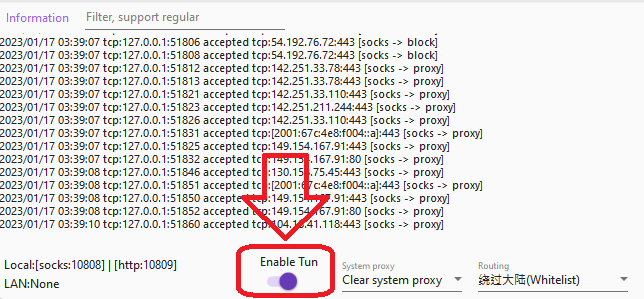
Because this mode needs to use sing-box, but it can only run as an administrator


