


Summary : in this tutorial, you will learn how to use the PostgreSQL CASE conditional expression to form conditional queries.
The PostgreSQL
CASE
expression is the same as
IF/ELSE
statement in other programming languages. It allows you to add if-else logic to the query to form a powerful query.
Since
CASE
is an expression, you can use it in any places where an expression can be used e.g.,
SELECT
,
WHERE
,
GROUP BY
, and
HAVING
clause.
The
CASE
expression has two forms: general and simple form.
1) General PostgreSQL
CASE
expression
The following illustrates the general form of the
CASE
statement:
CASE
      WHEN condition_1  THEN result_1
      WHEN condition_2  THEN result_2
      [WHEN ...]
      [ELSE else_result]
ENDCode language: SQL (Structured Query Language) (sql)
In this syntax, each condition (
condition_1
,
condition_2
…) is a boolean expression that returns either
true
or
false
.
When a condition evaluates to
false
, the
CASE
expression evaluates the next condition from the top to bottom until it finds a condition that evaluates to
true
.
If a condition evaluates to
true
, the
CASE
expression returns the corresponding result that follows the condition. For example, if the
condition_2
evaluates to
true
, the
CASE
expression returns the
result_2
. Also, it immediately stops evaluating the next expression.
In case all conditions evaluate to
false
, the
CASE
expression returns the result (
else_result
) that follows the
ELSE
keyword. If you omit the
ELSE
clause, the
CASE
expression returns
NULL
.
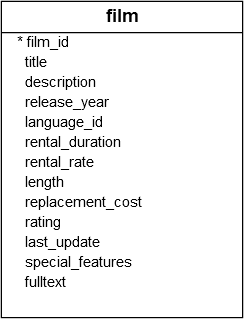
Let’s take a look at the
film
table from the
sample database
.
A) A general CASE example
Suppose you want to label the films by their length based on the following logic:
- If the lengh is less than 50 minutes, the film is short.
- If the length is greater than 50 minutes and less than or equal to 120 minutes, the film is medium.
- If the length is greater than 120 minutes, the film is long.
To apply this logic, you can use the
CASE
expression in the
SELECT
statement as follows:
SELECT title,
       length,
           WHEN length> 0
                AND length <= 50 THEN 'Short'
           WHEN length > 50
                AND length <= 120 THEN 'Medium'
           WHEN length> 120 THEN 'Long'
       END duration
FROM film
ORDER BY title;Code language: PHP (php)
Output:
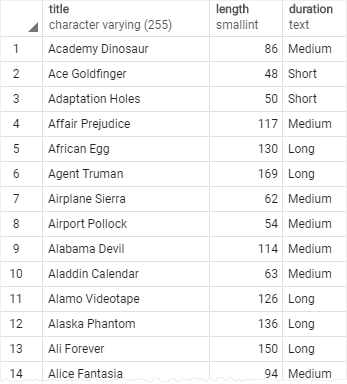
Note that we placed a
column alias
duration
after the
CASE
expression.
B) Using CASE with an aggregate function example
Suppose that you want to assign price segments to films with the following logic:
- If the rental rate is 0.99, the film is economic.
- If the rental rate is 1.99, the film is mass.
- If the rental rate is 4.99, the film is premium.
And you want to know the number of films that belong to economy, mass, and premium.
In this case, you can use the
CASE
expression to construct the query as follows:
SELECT
	SUM (CASE
               WHEN rental_rate = 0.99 THEN 1
	       ELSE 0
	) AS "Economy",
	SUM (
		WHEN rental_rate = 2.99 THEN 1
		ELSE 0
	) AS "Mass",
	SUM (
		WHEN rental_rate = 4.99 THEN 1
		ELSE 0
	) AS "Premium"
	film;Code language: SQL (Structured Query Language) (sql)
The result of the query is as follows:

In this example, we used the
CASE
expression to return 1 or 0 if the rental rate falls into each price segment. And we applied the
SUM
function to calculate the total of films for each price segment.
2) Simple PostgreSQL
CASE
expression
PostgreSQL provides another form of the
CASE
expression called simple form as follows:
CASE expression
   WHEN value_1 THEN result_1
   WHEN value_2 THEN result_2
   [WHEN ...]
   else_result
ENDCode language: SQL (Structured Query Language) (sql)
The
CASE
first evaluates the
expression
and compares the result with each value(
value_1
,
value_2
, …) in the
WHEN
clauses sequentially until it finds the match.
Once the result of the
expression
equals a value (value1, value2, etc.) in a
WHEN
clause, the
CASE
returns the corresponding result in the
THEN
clause.
If
CASE
does not find any matches, it returns the
else_result
in that follows the
ELSE
, or
NULL
value if the
ELSE
is not available.
A) Simple PostgreSQL
CASE
expression example
The following statement uses the
CASE
expression to add the rating description to the output:
SELECT title,
       rating,
       CASE rating
           WHEN 'G' THEN 'General Audiences'
           WHEN 'PG' THEN 'Parental Guidance Suggested'
           WHEN 'PG-13' THEN 'Parents Strongly Cautioned'
           WHEN 'R' THEN 'Restricted'
           WHEN 'NC-17' THEN 'Adults Only'
       END rating_description
FROM film
ORDER BY title;Code language: PHP (php)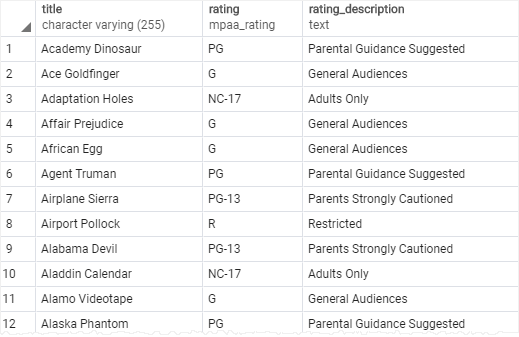
In this example, we used a simple
CASE
expression to compare the rating from the
film
table with some literal values like G, PG, NC17, PG-13 and return the corresponding rating description.
B) Using simple PostgreSQL
CASE
expression with aggregate function example
The following statement uses
CASE
expression with the
SUM
function to calculate the number of films in each rating:
SELECT
       SUM(CASE rating
             WHEN 'G' THEN 1
		     ELSE 0
		   END) "General Audiences",
       SUM(CASE rating
             WHEN 'PG' THEN 1
		     ELSE 0
		   END) "Parental Guidance Suggested",
       SUM(CASE rating
             WHEN 'PG-13' THEN 1
		     ELSE 0
		   END) "Parents Strongly Cautioned",
       SUM(CASE rating
             WHEN 'R' THEN 1
		     ELSE 0