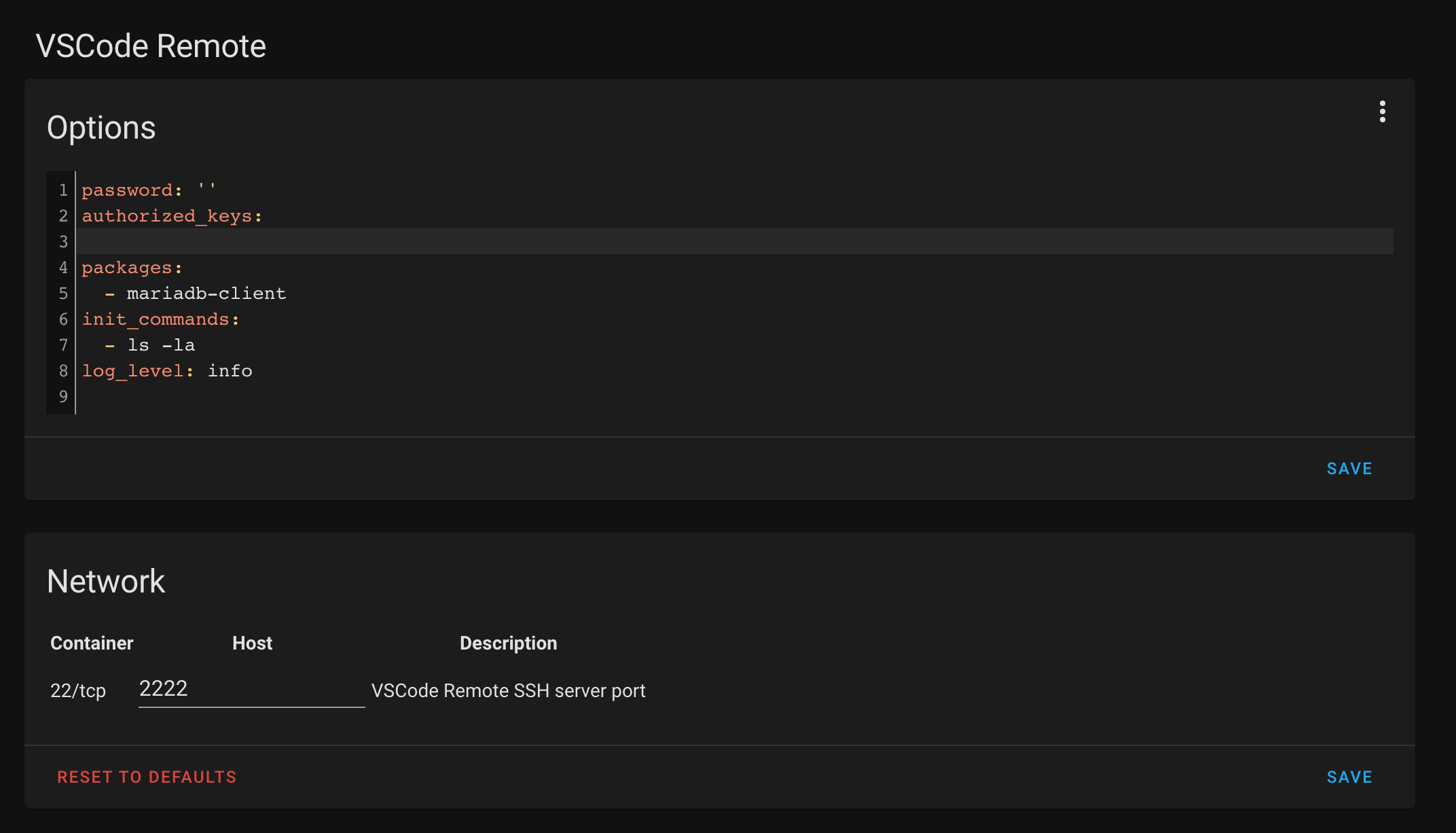
Goal: Connect my local vscode instance to the HA vscode add-on using ssh.
Setup: I’m currently running HA as a virtual appliance (x86_64/UEFI) via the qcow2 image on my unraid server.
What i did so far:
HA VM: Install vscode add-on
HA VM: Install official ssh add-on
Local PC: Install vscode and add the ssh extension
Local PC: Vscode add ssh connection:
This is how i added the connection:
ssh [email protected]
When i try to connect i get the following error:
Could someone layout how to get this working?
Thanks
It‘s still under development, to make use of the addon you need to add the following link to your repository list.
https://addons.community/edge
VS Code Remote Add-on in HA Supervisor
SSH & Web Terminal Add-on in HA Supervisor (not sure if I event need this)
VS Code Remote extensions in VS Code
Any Network port mappings that your had to setup
I’m trying to dev on my HA server remotely
HA is tied to nabu casa
And I also have the network my HA is on mapped to dynamic DNS.
So I typically connect with the following settings.
URL:
hassio.domain.com
This works for every SSH Dev IDE I have EXCEPT VS Code
I’m a little lost between
Supervisor Add-on Settings + VS Code Remote Settings + Home Network Settings.
There is the VS Code add-on and the VS Code Remote add-on which is currently still in development.
VS Code Remote Add-on in HA Supervisor
Sure, actually all you need is to to do is add your ssh public key to the extensions config section (authorised_keys) and create a port forwarding in your router for eg. port 2222.
SSH & Web Terminal Add-on in HA Supervisor (not sure if I event need this)
It’s not needed, the VS Code remote add-on is handling this for you.
VS Code Remote extensions in VS Code
I haven’t set it up myself yet, but be aware that you want to do this on the code server you are connecting to (the vscode remte add-on). It’s probably pre configured but im not sure.
marketplace.visualstudio.com
Don’t forget, that the code server it self is running on the same network / docker network as Home-assistant and that it can connect locally even though you connect to the remote add-on remotely.
Any Network port mappings that your had to setup
Port forward the ssh port you configured in the vs code remote add-on. Make sure to use ssh key authentication only.
This works for every SSH Dev IDE I have EXCEPT VS Code
This is not natively supported on Hassos, therefor you need to use the remote add-on created by Frank.
Have a look at this for a better understanding of the ssh remote dev solution by vscode.
code.visualstudio.com
Since hassio-addons/addon-vscode-remote seems to be broken:
Unable to connect from VSCode or command line - access denied · Issue #59 · hassio-addons/addon-vscode-remote · GitHub
(I get the same error) and no one is willing to fix it.
I run daily checks for base image updates and test every image before pushing it to dockerhub.
Feel free to use it.
No hate towards
@mietz
, this can be achieved with the SSH & Terminal addon that many likely already have.
Here's the required configuration parameters (everything else is à votre gout)
Some customization is required prior to being able to connect to your Home Assistant install with Visual Studio Code. The following configuration will aid in setting up VSCode Remote - SSH:
packages:
- gcompat
- libstdc++
- curl
allow_remote_port_forwarding: true
allow_tcp_forwarding: true
Allowing remote port and tcp forwarding lower the overall level of security of your SSH server. Nevertheless, this warning is debatable.
It is
not
required to disable protection mode for this to work correctly.
The Studio Code Server addon is not required for this to work correctly.
This will not work through Home Assistant Cloud. LAN only unless you've exposed your server directly to the internet.
I’m trying to get this working and I’ve got the following config in my SSH & Terminal add-on:
authorized_keys:
ssh-ed25519
KEY_GOES_HERE
password: ""
apks: []
server:
tcp_forwarding: false
apks: []
sftp: true
compatibility_mode: true
packages:
- glibc
- gcompat
- libstdc++
- curl
allow_remote_port_forwarding: true
allow_tcp_forwarding: true
I’m now getting different output in my remote VS Code, but it’s a WAITING FOR SERVER LOG. VS Code is also complaining about
The remote host may not meet VS Code Server’s prerequisites for glibc and libstdc++
I must be doing something wrong, but I’m not sure what. I can SSH to the server on port 22 (what I have set in the config). Thanks for the help!
It looks like I’ve got this working, although, I’m not sure how:
apks:
- gcompat libstdc++ curl grep
server:
tcp_forwarding: false
apks: []
sftp: true
compatibility_mode: true
packages:
- glibc
- libc
- gcompat
- libstdc++
- curl
- musl
allow_remote_port_forwarding: true
allow_tcp_forwarding: true
The solution works for me, but although vscode connects fine, I still get the warning:
The remote host may not meet VS Code Server’s prerequisites for glibc and libstdc++
Anyone figured out how to silence the warning?
Hey all. In trying to get this working I felt like it was all just throwing spagetti at a wall. So I went about figuring out how all this works.
This VS Code docs page describes the prerequisite libraries preinstalled for each linux distribution.
Running cat /etc/os-release in the HomeAssistant SSH terminal results in this.
NAME="Alpine Linux"
ID=alpine
VERSION_ID=3.17.3
PRETTY_NAME="Alpine Linux v3.17"
HOME_URL="https://alpinelinux.org/"
BUG_REPORT_URL="https://gitlab.alpinelinux.org/alpine…
As per October 2023 the correct way to write this config is:
authorized_keys:
- >- YOUR KEYS HERE
password: ""
apks:
- gcompat
- libstdc++
- curl
server:
tcp_forwarding: true
Hello,
The remote host may not meet VS Code Server’s prerequisites for glibc and libstdc++
I’ve read through these posts and tried the solutions proposed, without success.Advanced SSH & Web Terminal add-on, following distante’s proposal above .
I’ve restarted the add-on and am still getting the warning when connecting VS Code.
Thanks in advance for your help.
username: USER
password: PASSWORD
authorized_keys:
- >- KEYS
sftp: false
compatibility_mode: false
allow_agent_forwarding: false
allow_remote_port_forwarding: true
allow_tcp_forwarding: true
apks:
- gcompat
- libstdc++
- curl
server:
tcp_forwarding: true // is this redundant with `allow_tcp_forwarding` above?
Hello, i read all this thread, and test all configuration but Vscode can’t connect.
Waiting for server log ...
Waiting for server log ...
Waiting for server log ...
My HA version is working on VM and is up to date.
i found more log in vscode console
17:06:05.952] > Waiting for server log...
[17:06:05.984] > Waiting for server log...
[17:06:06.016] >
> * Visual Studio Code Server
> * By using the software, you agree to
> * the Visual Studio Code Server License Terms (https://aka.ms/vscode-server-license) and
> * the Microsoft Privacy Statement (https://privacy.microsoft.com/en-US/privacystatement).
[17:06:06.018] > Server did not start successfully. Full server log at /root/.vscode-server/.05047486b6df5eb8d44b2ecd70ea3bdf775fd937.log >>>
> musl libc (x86_64)
> Version 1.2.4
> Dynamic Program Loader
> Usage: /lib/ld-musl-x86_64.so.1 [options] [--] pathname
> Warning: musl detected, skipping GLIBC check
> Error relocating /root/.vscode-server/bin/05047486b6df5eb8d44b2ecd70ea3bdf775fd937/node: fcntl64: symbol not found
> <<< End of server log
Hello, I’m facing exactly the same issue described by @xiduis15 .@xiduis15 .
HA 2024.1.6.
Studio Code Server add-on 5.15.0.
Advanced SSH & Web Terminal add-on 17.0.4.
VS Code desktop: Version: 1.86.0 / Commit: 05047486b6df5eb8d44b2ecd70ea3bdf775fd937
Thanks for any help.
Hello, FYI the issue seems to be on VS Code’s side with the 1.86.0 update.
I’ve found several issues describing the same problem on VS Code’s GitHub.
VS Code do not connect to any SSH Remote server #204025 error using remote - SSH after update to 1.86.0 #204054 couldnt run ssh #204091 EDIT: I found the exact description of the issue here:
vscode server won’t start: “Waiting for server log…” #203967 Watching this specific issue will let us know when it’s resolved.
For the moment the solution seems to be to downgrade VS Code to 1.85.2.
Happy to report that I’ve solved the issue by:
Launching my VS Code desktop version 1.86.0.
Downgrading the remote-ssh extension version to 0.107 from within VS Code.
Changing the ‘update mode’ setting to ‘none’ (will require a restart of VS Code).
Downloading and installing version 1.85.2 of vscode.
After following these steps, I’m now able to connect my desktop VS Code (1.85.2) to VS Code HA add-on via SSH, as I used to previously.
The underlying issue remains however: a dependency on some libraries on HA add-on’s side (minimum GLIBC >= 2.28 apparently from the comments in the GitHub issues) is preventing VS Code 1.86.0 from connecting successfully over SSH.